AI video tools are among the most advanced AI tech available, including chatbots and AI image generators. Multimodal models can create entire clips, complete with audio, in a matter of minutes. But they are not created equal. It’s easy for the tech to mess up, and there’s a big difference in the quality of their outputs. That’s why CNET reviewers have spent time thoroughly testing each program to find the best one for you, no matter your project, budget or creative needs.
Our Picks

Bottom Line
Adobe’s Firefly models are some of the only options available that guarantee any content you make with its AI is commercially safe. That means…
Pros & Cons
Lots of hands-on controls and settings
Built into Adobe programs
Videos are safe for commercial use
No native audio, have to add sound effects or dialogue after
Expand Pros & Cons
Bottom Line
Veo 3 is one of the most popular AI video models, and for good reason. Veo 3 was the first AI video tool from a major tech company to automati…
Pros & Cons
Cinematic videos with smooth, natural motions
Can be used in Gemini, Canva, Google’s AI Studio and Flow
Expand Pros & Cons
Bottom Line
If you don’t know a lot about AI, you probably haven’t heard of Runway. But its AI models pack a strong punch. Runway is an AI-inclined profes…
Pros & Cons
Extremely creative
Great for brainstorming and animating images
Expand Pros & Cons

Bottom Line
Midjourney was one of the first creative AI companies, and its V1 video model will feel familiar to its fans. It’s an extremely simple AI tool…
Pros & Cons
Very simple to navigate and use
Open gallery for inspiration and community focus
No audio
Doesn’t always adhere to prompts
Expand Pros & Cons
The best AI video generators create clips that align with what you want while having as few errors as possible. But hallucinations happen with even the best AI programs, so those with more advanced features and hands-on controls let you further customize your videos, offering better odds of getting the clip you want. This is everything you need to know to pick the best AI video generator for you.
What’s the best AI video generator?
The best AI video generator for you is going to depend on your skill level, budget and project. The best paid AI video generator for cinematic videos is Veo 3 by Google. If you want to use AI videos in your professional work, you’ll want to use Adobe Firefly. (Disclosure: Ziff Davis, CNET’s parent company, in 2025 filed a lawsuit against OpenAI, alleging it infringed Ziff Davis copyrights in training and operating its AI systems.)
This cozy cabin was made with Adobe Firefly. / Created by Katelyn Chedraoui using Adobe Firefly AI
Best professional AI video generator for creative workers
Adobe Firefly
Lots of hands-on controls and settings
Built into Adobe programs
Videos are safe for commercial use
No native audio, have to add sound effects or dialogue after
Adobe’s Firefly models are some of the only options available that guarantee any content you make with its AI is commercially safe. That means you can use the AI images, videos and audio you make with Firefly in your professional work. That’s undeniably a major perk for creators, as is the ability to use several non-Adobe AI models through Firefly and other programs like Photoshop.
The Firefly platform lets you set your resolution (540p-1080p), choose from a wide variety of styles and camera motions and upload reference videos for composition and motion. These expanded controls are great for creators who want to constraint the model’s creativity to fit specific projects. Firefly videos are vibrant, detailed and great for nearly any project. While you can record and generate sound effects, Firefly videos don’t natively generate audio with AI videos.
Price
Plans begin $10 per month
Video duration
5 seconds
Audio?
Not natively synchronized to videos but can add AI audio after
Privacy policy
Commercially safe, doesn’t train on your content
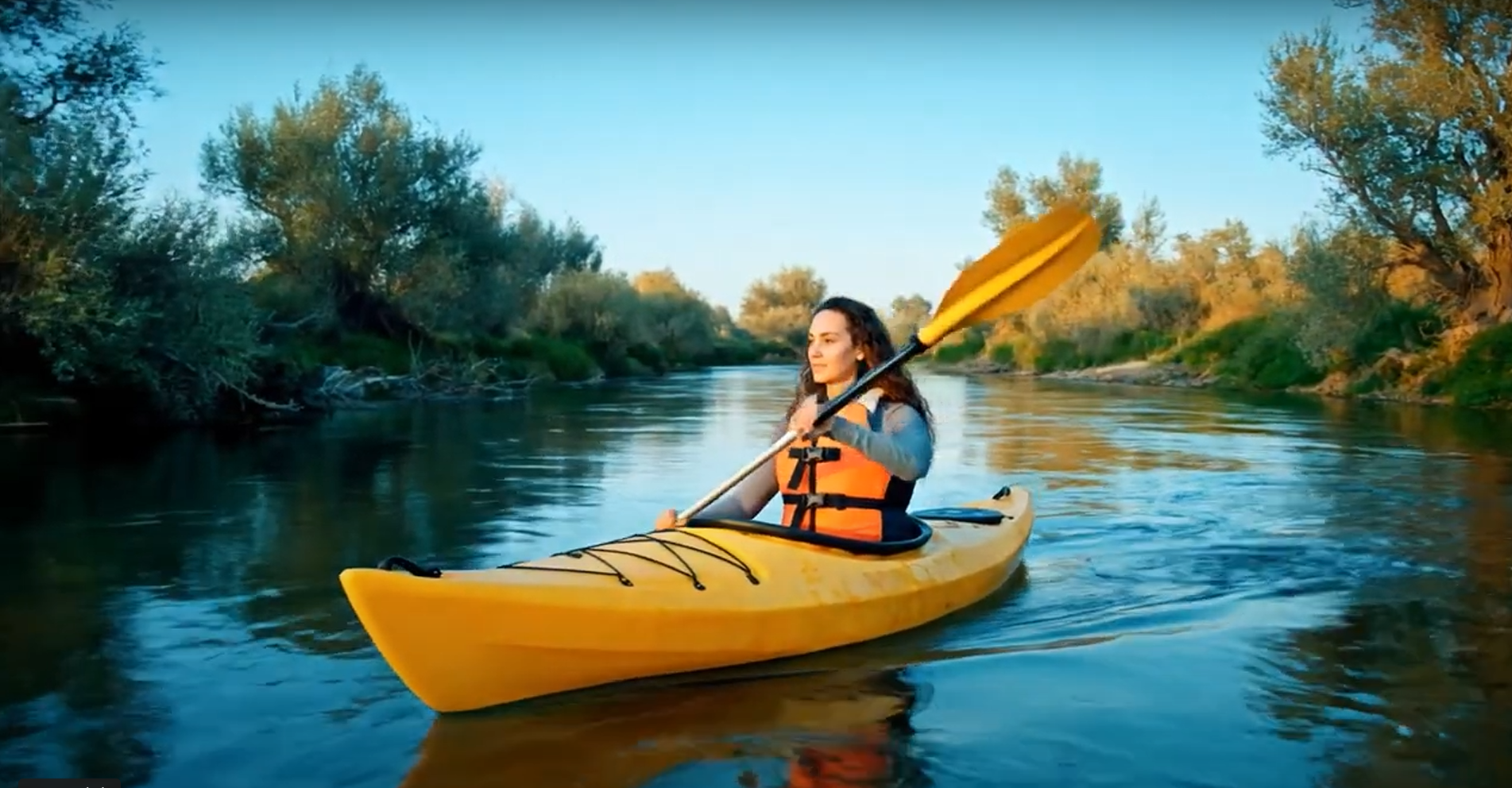
One of the AI-generated videos I got from Google’s Veo 3 was of a woman paddling a kayak on a river, complete with splashing sounds. / Google Veo 3 / Screenshot by CNET
Best cinematic AI video generator for anyone
Veo and Omni by Google
Cinematic videos with smooth, natural motions
Can be used in Gemini, Canva, Google’s AI Studio and Flow
Veo 3 is one of the most popular AI video models, and for good reason. Veo 3 was the first AI video tool from a major tech company to automatically create and synchronize AI audio to its AI videos, an important leap forward for creators and the field as a whole. Now, you can use Veo 3 in a variety of places to create cinematic videos with smooth motions.
Omni is Google’s latest video model, released at I/O 2026. It has multimodal capabilities, letting you use text, images and videos in your prompts.
You can use Google’s AI video tech in Gemini, Canva, Adobe and a wide range of Google platforms. That’s great for creators who may work in other programs and want to use Google’s latest video model. Google’s AI is a great choice for anyone looking for cinematic, high-quality generative video clips. If you’re already paying for Gemini or another AI creative service, odds are you already have access to a video model. And with that, you’ll likely get you the results you need, no additional subscription required.
Price
Available with subscriptions, starting at $20 per month
Video duration
8 seconds
Audio?
Yes
Privacy policy
Gemini can use your information to improve its AI
Best creative AI video generator for experts and enthusiasts
Runway
Extremely creative
Great for brainstorming and animating images
If you don’t know a lot about AI, you probably haven’t heard of Runway. But its AI models pack a strong punch. Runway is an AI-inclined professional’s playground. It offers image, video and audio generation, and its platform comes stacked with the tools to customize your content settings before you click generate. Runway is one of the most creative models and is capable of handling a wide range of projects. Runway videos don’t natively generate with sound, but you can create and layer AI audio within the Runway platform. Runway is a great choice for creators who want to explore all kinds of AI content creation and create high-quality, detailed results.
Price
Free, with options to upgrade
Video duration
5-10 seconds
Audio?
No
Privacy policy
Usage policy states that it trains on your prompts and generated videos, but doesn’t retain ownership over them
Midjourney AI now has a video generator. / Screenshot of a Midjourney AI video generated by Katelyn Chedraoui
Best basic AI video generator for beginners
Midjourney
Very simple to navigate and use
Open gallery for inspiration and community focus
No audio
Doesn’t always adhere to prompts
Midjourney was one of the first creative AI companies, and its V1 video model will feel familiar to its fans. It’s an extremely simple AI tool to navigate, which is great if you just want to play around or create something quickly. Midjourney is very creative, though it struggles with more realistic outputs. The video model is a natural extension of Midjourney; you can animate your existing Midjourney images to bring them to life. Midjourney is a great choice for beginners or amateurs who don’t need designs within a specific style or brand guide.
Price
Plans begin at $10 per month
Video duration
5 seconds, can extend up to 21 seconds
Audio?
No
Privacy policy
Can use your info to train its machine learning algorithms
How we tested AI video generators
CNET takes a practical approach to testing AI generators. Reviewers spend time using each program to create a wide variety of content. AI video generators are given a battery of tests that measure how well they handle a diverse set of prompts, from photorealistic to fantastical scenarios. We consider a service’s speed, creativity, errors known as hallucinations and its ease of use. We also closely inspect each program’s privacy and usage policies, as these can have a significant impact on how people use (and potentially misuse) each service.
AI video generators compared
CNET top picksBest forPriceStyleLatest modelGoogle Veo/OmniGemini users or Google One subscribersPlans begin at $20 a month after 1-month free trial expiresCinematic, high-quality clips; can do realistic and other stylesOmniAdobe FireflyProfessional workers in creative fieldsPlans begin at $10 a month. May be included in existing Adobe plansVersatile; handles different styles wellFirefly VideoMidjourneyBeginners or AI enthusiastsPlans begin at $10 a monthVery creative, excels at nonrealistic styles. Great for brainstormingV1RunwayAI enthusiasts who want a high-quality video with more hands-on controlsFree, with paid plans beginning at $15 a monthExcels at a variety of styles; creates very detailed clipsGen 4.5
Risks to consider when using AI video generators
Using AI video generators can speed up your creation, but they come with risks. We’ve seen a massive rise in deepfakes and low-quality, weird videos that have been dubbed AI slop. AI companies have guardrails in place intended to stop users from creating illegal, abusive or otherwise inappropriate videos, but we’ve already seen how imperfect these systems are. If you’re using a service that lets you upload reference images, use name brands in your prompts or use another person’s likeness, you need to be extremely careful. You could be infringing on existing legal protections (like copyright) or find yourself in a position where you don’t have the rights to use your AI-generated content or have created content of no value, wasting energy needed to power AI.
If you want to make AI videos, some best practices to mitigate your legal and ethical risks include not using someone’s likeness without their permission and avoiding brand names and logos. Two of the best rules of thumb are the simplest, too. If you think you shouldn’t make a certain AI video, don’t do it. And always, always disclose your use of AI when sharing it online and with others.
Factors to consider
Many creators, publishers and content catalog owners are worried that their content was used to train AI models without their permission or compensation. There are also concerns that AI-generated content could violate existing copyright protections and that AI companies aren’t able to prevent the creation of potentially abusive and illegal AI content. No AI company is immune to these issues, including our top picks below, but some come with less information and protection than others. This is why you should always check a service’s privacy and usage policy before using it and always disclose your use of AI.
Accuracy is one of the most important factors to consider when selecting an AI video generator. You want to pick a program that has strong prompt adherence, meaning it’s able to do what you ask in your prompt. Writing a good prompt is essential to this process, but the model should be capable of handling nearly any request.
AI video generators are prone to errors known as hallucinations, especially when it comes to following the laws of physics. For example, a great AI video generator won’t have a person floating through solid objects or objects appearing out of nowhere (unless instructed to do so). While every AI program messes up sometimes, a capable generator won’t regularly produce these kinds of errors.
Because hallucinations are unavoidable with AI, the ability to edit your content is also important. More creative AI platforms are introducing tools to edit your output, which is great as it gives you more hands-on controls to perfect AI outputs. If many clarifying prompts are required or if you’re not able to edit your content, those are signs you may want to switch to another program.
Creativity is also important. Creative AI tools are often used for brainstorming, exploration and planning. The best AI video models can bring a wide variety of artistic ideas to life and build off your reference images.
Response speed is another factor. Generating AI videos is a complex task, so most models are able to create them in between two and five minutes. Models that take longer to generate videos may be annoying to use, but if they result in better videos, the trade-off may be worthwhile. On the flip side, a model that produces good results quickly is noteworthy, too.
You’re also going to want to read the fine print, meaning a company’s privacy and usage policies. There are a lot of concerns about how AI models are created and whether copyright-protected content was used. Creators, celebrities and public figures have loudly voiced concerns over the ability of AI video generators to make content that’s indistinguishable from reality. This is especially worrisome as we’ve seen how companies’ guardrails against creating illegal and abusive content aren’t perfect. You ought to understand how the AI company is using your data, moderates content and what ownership or rights you retain over the videos — these vary by service.

Notice the level of detail in this AI-generated android butler.
Created by Katelyn Chedraoui using Runway AI
AI video generator FAQs
How can I tell if a video is real or made with AI?
It’s harder than ever to tell if something is real or AI-generated. Be on the lookout for watermarks and labels denoting that something was made with an AI program. You can also check an image, video or audio’s metadata, which might give you clues to its origins. The best thing you can do is remain vigilant and not automatically believe everything you see online.
What’s the best AI video generator for business?
Adobe Firefly is the best AI video generator for small, medium and large businesses. AI content created with Firefly is commercially safe, so you can use Firefly-generated content without intellectual property concerns.
Should I disclose that my video was made with AI?
Yes. You absolutely should disclose when you created a video using AI. This is not only a best practice, but it helps anyone who comes across the video online recognize that what they are seeing was generated with AI.
What do I need to know about copyright and AI videos?
Be careful of generating content that could infringe upon copyrights. Most platforms have guardrails and policies to prevent the creation of illegal or abusive AI content. Some AI companies, including Midjourney, have been sued for their ability to create AI content that allegedly violates existing copyright protections. For more, check out our guide to copyright law in the age of AI.
Editor’s note, June 30: We removed Sora by OpenAI from this list because it is no longer generally available. OpenAI announced on March 24 that it was discontinuing Sora. It was previously selected as our best free AI video generator. We will keep this list up to date as changes occur.

Katelyn Chedraoui
Reporter 2
Katelyn is a reporter with CNET covering artificial intelligence, including chatbots, image and video generators. Her work explores how new AI technology is infiltrating our lives, shaping the content we consume on social media and affecting the people behind the screens. She graduated from the University of North Carolina at Chapel Hill with a degree in media and journalism. You can reach her at kchedraoui@cnet.com.
See full bio